
WebMCP lets a page advertise actions to browser agents as named tools with descriptions and typed inputs. That sounds useful when an agent has to work out which controls to use. But browser agents can already read and operate a well-labeled page. I wanted to see what WebMCP adds when both paths are available.
The short answer: agents don’t need it to succeed, but a small set of well-designed tools cut their steps every time and made most of them faster.
I gave six models the same todo tasks on two builds of an Angular app, one with WebMCP tools and one without: Claude Haiku, Sonnet and Opus in Claude Code, and GPT-6 Luna, GPT-5.6 Terra and GPT-6 Sol in Codex CLI. Every run succeeded either way. With the tools, agents needed fewer browser commands in all twelve pairs and finished faster in ten.
The todo experiment
I built one small Angular todo app. Every control has an accessible name, each todo’s checkbox is labeled with its text, the “More actions” menu works with the keyboard, and a status line such as “3 total · Showing all · 3 matches” is announced to screen readers whenever its text changes. It comes in two builds with the same component and signal store. One registers six WebMCP tools on its route; the other registers none.
The tools follow Chrome’s tool-design guidance. Each does one thing: add_todo, set_todo_completed, remove_todo, clear_completed, search_todos and show_todos. None overlap. Each result reports the list’s new state, such as “3 todos, 1 completed”, so an agent can check its work without reading the page again.
One action sits behind a menu on purpose. “Clear completed” lives in the “More actions” menu, and until the menu opens only the “More actions” button is in the accessibility tree. That’s normal, accessible menu behavior, and also a common place for an agent to miss an action. On the WebMCP build, clear_completed is always listed, so Task C below favors the tools by design.
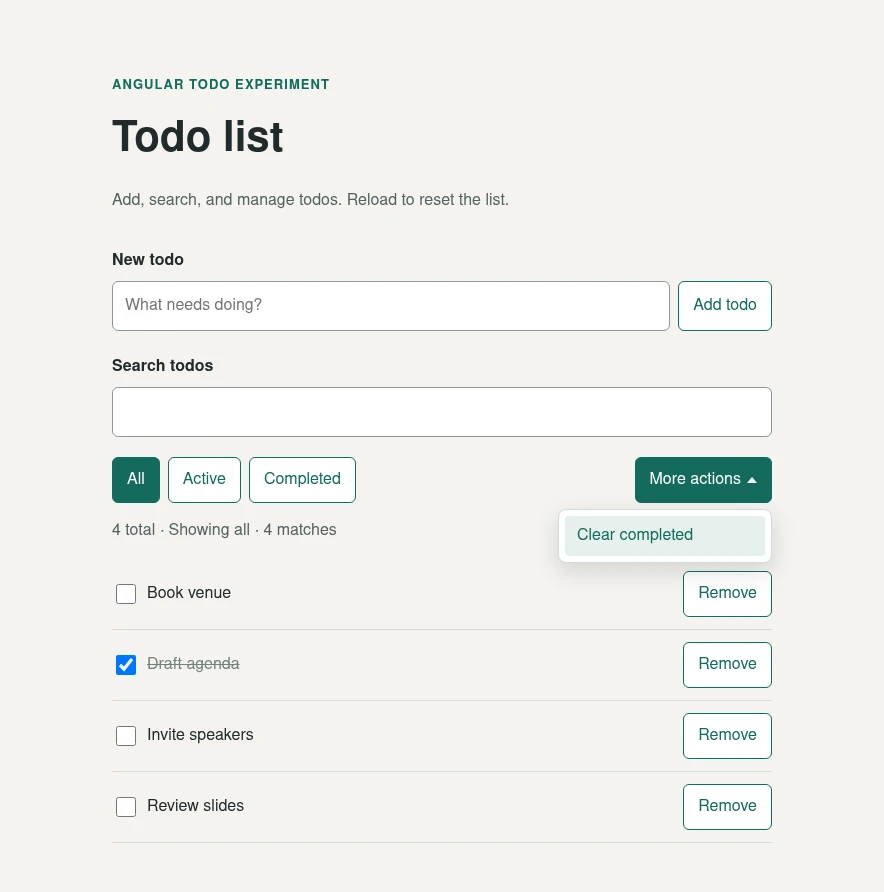
The app with the “More actions” menu open. Both builds look the same; only the WebMCP build registers tools.
A DOM-only agent, one that only uses the page’s own controls, works from a snapshot taken by Playwright CLI, a command-line tool coding agents use to drive a browser. The snapshot is an accessibility-tree outline: each control’s role, such as button or checkbox, its accessible name and its state. On a WebMCP-enabled page, the snapshot also lists the page’s tools and their schemas. I confirmed the DOM-only build’s snapshot contains no tool descriptions, which is why separate builds mattered here.
Before any agent runs, I checked the app two ways, as Chrome’s eval guide suggests. A script called every tool with good and bad input and checked the page, including the menu’s keyboard behavior; all 26 checks passed. And given the tool list and eight plain requests, such as “clean up everything I have already finished”, all six models picked the right tool with the right arguments every time.
Every agent got the same outcome-based tasks. Task A added six todos, checked two and searched for one. Task B added twelve, checked and unchecked items, removed one, searched and filtered. Task C added eight, completed five, then asked to “remove all completed todos”, without mentioning the menu. No agent was told which path to use. On the WebMCP build it could call the tools or use the page controls; on the DOM-only build it had only the page.
I ran Claude Haiku 4.5, Sonnet 5 and Opus 5.5 in Claude Code, and GPT-6 Luna, GPT-5.6 Terra and GPT-6 Sol in Codex CLI, all at medium reasoning effort, each on both builds, with and without Playwright CLI’s optional agent skill.
The skill is a set of instructions the agent reads before it starts; it documents shortcuts such as fill --submit and the WebMCP commands. Claude Code loads the skill itself; the Codex agents were told to read it. That makes 24 runs, or twelve DOM-only/WebMCP pairs, all on Playwright CLI 0.1.21. Codex has no command allowlist, so its prompt limited agents to playwright-cli and date; a scan of every command in every run found no agent reading the app’s source, running page scripts or calling a tool it wasn’t allowed to. Each agent printed a timestamp at the start and end of each task, and I counted every Playwright CLI command from the session log. Each command counts once, even when several run in one shell call.
What the runs showed
DOM-onlyWebMCP
Seconds for Tasks A, B and C together. Lower is faster.
Without the Playwright CLI skill: seconds, Tasks A to C
With the Playwright CLI skill: seconds, Tasks A to C
DOM-onlyWebMCP
Playwright CLI commands for Tasks A, B and C together. Each command counts once, even when several run in one shell call. Lower is fewer steps.
Without the Playwright CLI skill: browser commands, Tasks A to C
With the Playwright CLI skill: browser commands, Tasks A to C
| Model | Skill | Agent path | Task A | Task B | Task C | Browser commands | Model turns | Input tokens (cached) | Output tokens |
|---|---|---|---|---|---|---|---|---|---|
| Claude Haiku | No | DOM-only | 62.7 s | 54.3 s | 32.5 s | 95 | 51 | 1,726,426 (1,696,093) | 9,152 |
| Claude Haiku | No | WebMCP | 31.3 s | 35.6 s | 21.5 s | 49 | 35 | 1,106,034 (1,083,961) | 6,857 |
| Claude Haiku | Yes | DOM-only | 33.5 s | 45.8 s | 43.7 s | 69 | 52 | 2,022,426 (1,987,964) | 8,797 |
| Claude Haiku | Yes | WebMCP | 32.4 s | 42.3 s | 24.7 s | 48 | 35 | 1,134,181 (1,110,550) | 6,238 |
| Claude Sonnet | No | DOM-only | 38.2 s | 68.9 s | 56.2 s | 86 | 92 | 4,704,119 (4,666,973) | 8,023 |
| Claude Sonnet | No | WebMCP | 45.4 s | 42.6 s | 30.6 s | 54 | 63 | 1,240,946 (1,214,356) | 8,417 |
| Claude Sonnet | Yes | DOM-only | 36.3 s | 75.7 s | 48.1 s | 62 | 64 | 3,283,864 (3,239,476) | 6,147 |
| Claude Sonnet | Yes | WebMCP | 47.9 s | 50.1 s | 32.7 s | 51 | 61 | 1,360,510 (1,323,709) | 7,758 |
| Claude Opus | No | DOM-only | 25.9 s | 35.4 s | 30.3 s | 67 | 27 | 806,548 (782,421) | 5,513 |
| Claude Opus | No | WebMCP | 28.5 s | 32.5 s | 23.7 s | 57 | 21 | 576,785 (556,703) | 5,213 |
| Claude Opus | Yes | DOM-only | 29.5 s | 42.3 s | 29.3 s | 69 | 27 | 871,233 (843,357) | 5,661 |
| Claude Opus | Yes | WebMCP | 28.8 s | 34.5 s | 19.7 s | 53 | 17 | 443,158 (419,201) | 4,336 |
| GPT-6 Luna | No | DOM-only | 32.4 s | 35.8 s | 27.6 s | 101 | 18 | 395,603 (364,032) | 3,293 |
| GPT-6 Luna | No | WebMCP | 30.6 s | 47.1 s | 20.9 s | 55 | 13 | 260,027 (225,024) | 2,358 |
| GPT-6 Luna | Yes | DOM-only | 32.9 s | 36.3 s | 30.5 s | 57 | 23 | 529,089 (493,824) | 3,032 |
| GPT-6 Luna | Yes | WebMCP | 27.7 s | 37.9 s | 28.9 s | 51 | 21 | 469,591 (439,040) | 2,630 |
| GPT-5.6 Terra | No | DOM-only | 38.7 s | 51.2 s | 43.6 s | 86 | 32 | 739,681 (696,320) | 3,834 |
| GPT-5.6 Terra | No | WebMCP | 40.4 s | 38.7 s | 28.1 s | 54 | 15 | 307,543 (281,856) | 2,970 |
| GPT-5.6 Terra | Yes | DOM-only | 35.4 s | 46.1 s | 36.6 s | 60 | 26 | 632,925 (594,432) | 3,304 |
| GPT-5.6 Terra | Yes | WebMCP | 29.9 s | 38.8 s | 48.0 s | 51 | 22 | 524,941 (493,056) | 3,488 |
| GPT-6 Sol | No | DOM-only | 53.7 s | 57.5 s | 45.7 s | 101 | 25 | 596,501 (552,576) | 3,732 |
| GPT-6 Sol | No | WebMCP | 39.6 s | 49.5 s | 35.6 s | 55 | 22 | 492,748 (460,672) | 3,159 |
| GPT-6 Sol | Yes | DOM-only | 33.7 s | 42.0 s | 35.4 s | 60 | 23 | 555,987 (512,128) | 2,709 |
| GPT-6 Sol | Yes | WebMCP | 37.6 s | 56.0 s | 35.3 s | 56 | 25 | 634,721 (608,000) | 3,386 |
Every run completed all three tasks, and every agent on the WebMCP build chose the tools on its own. WebMCP needed 7 to 48% fewer browser commands in all twelve pairs. It was faster in ten, by 1 to 41%, and used fewer input tokens in eleven.
All six Claude pairs were faster and cheaper; the twelve Claude runs cost $5.64 together, from $0.19 for Haiku with WebMCP to $1.16 for Sonnet without the skill on the DOM-only build. Adding a todo took one add_todo call instead of a fill and a click, and the tool’s result could stand in for a snapshot to check it. Most of the gain came in the longer Tasks B and C; in five pairs, Task A was slower with WebMCP.
Task C shows the menu at work. The task only asked to remove all completed todos, and removing them one by one with the visible Remove buttons does exactly that. Eleven of the twelve DOM-only agents did it that way, in 20 to 32 commands. Only GPT-6 Luna with the skill opened “More actions” and used “Clear completed”. Every WebMCP agent called clear_completed once and finished Task C in 15 to 17 commands.
Time and tokens follow the number of model turns more than the number of commands, because each turn sends the conversation to the model again. WebMCP cut turns in eleven pairs. The two slower pairs show the other side. GPT-6 Sol with the skill took more turns with WebMCP, 25 against 23, and was 16% slower. GPT-6 Luna without the skill ran several commands per turn, so its extra DOM-only commands cost it little time, and WebMCP was 3% slower. Of the Claude models, Opus needed the fewest turns, so it gained the least without the skill: 8% less time. A second run of the four Opus sessions pointed the same way, 14 and 15% faster. The skill cut the DOM-only agents’ commands for five of the six models, but led only Luna to the menu. The WebMCP agents barely changed with it.
Agents chose their own command and verification sequences. Times include the model’s thinking between commands. Each search had exactly one match, so none of these runs tested finding an item from an ambiguous description.
What this result means
Accessibility is the floor. Every DOM-only agent completed every task, including the one behind the menu; eleven of twelve just took the long way around. The tools didn’t make anything possible that the accessible UI couldn’t do.
What the tools added was efficiency, most of the time. With one call per action and results that report the new state, every agent needed fewer steps, and most needed fewer model turns and finished faster for less.
Every WebMCP agent also used the bulk action that only one DOM-only agent found. The two slower pairs are a reminder that a tool saves time only when it saves model turns. The skill cut commands for most DOM-only agents, but not to WebMCP’s level.
WindTunnel v1.2 points the same way on efficiency, at a larger scale: 21 agent setups on 49 tasks across eight open-source apps, three attempts per task, with WebMCP tools written by the benchmark’s authors. All nine WebMCP setups solved all 49 tasks, and their median time and cost beat the median of the other methods. On success the results differ: the two setups closest to my DOM-only agents read the accessibility tree and solved only 42 and 40, often running out of turns, while every DOM-only agent here finished. Longer tasks on larger apps leave more room to fail.
WebMCP has costs too. Each tool is something to own: a schema, runtime validation, authorization checks, tests, and an experimental API that can still change. The WebMCP explainer warns that tool descriptions consume context and overlapping tools can confuse agents. And a second set of actions can drift from the UI it mirrors, the same risk any parallel API carries.
What an agent needs to use WebMCP
The WebMCP draft, a W3C Community Group report rather than a standard, defines tools registered by the open page through document.modelContext.
An agent needs a browser connection that can discover and invoke them; fetching the URL or connecting to a conventional MCP server is insufficient. Chrome’s comparison explains the distinction. Available connections include:
| Browser connection | WebMCP support |
|---|---|
| Playwright CLI | Yes. Since v0.1.20, webmcp-list discovers page tools and webmcp-call invokes one. |
| Playwright MCP | Yes. Since v0.0.82, it exposes a page’s registered tools to an MCP client as webmcp_<tool> tools. The list follows the active tab. |
| Chrome DevTools for agents | Yes, experimentally. It can list and execute page tools when its WebMCP category is enabled. |
So a coding agent such as Claude Code can only call page tools through a connection like Playwright CLI or Playwright MCP that has the page open. Its support for ordinary MCP servers doesn’t reach tools inside a web page.
For example, after opening a WebMCP-enabled page in a supported browser session, a coding agent using Playwright CLI can run:
playwright-cli webmcp-list
playwright-cli webmcp-call clear_completed --params='{}'
The Playwright CLI documentation says page-provided tool descriptions and results should be treated as untrusted input. WebMCP is still experimental: Chrome offers an origin trial and a local development flag.
Angular gives WebMCP tools a lifecycle
Angular’s experimental WebMCP support makes registering a tool cheap: it wraps registration in providers, and a tool can call a service method you already have. Put a tool in application providers and it lives with the app. Put it in route providers and it lives with that route. The execute callback runs in Angular’s injection context, so it can call inject() to reach the same services as the rest of the application. That context only lasts until the first await, so inject what you need before awaiting anything.
I register most tools on their route, not the app. Then adding one is a decision about a single page. Angular recommends withAutoCleanupInjectors() so a route’s tools are removed after navigation; otherwise an agent might see an action from a page the user has left. Scoping also keeps snapshots small: Playwright CLI lists every registered tool and its schema at the top of each snapshot, for DOM-only agents too. App-wide providers suit the few tools that make sense everywhere, such as search. For a flow that spans several routes, such as a checkout, the provider can sit on the parent route, so the tool lives for the whole flow.
In the experiment the tools live in their own file, with small helpers for the result text and for errors:
// todo-tools.ts
import { inject, provideExperimentalWebMcpTools } from '@angular/core';
import { TodoStore } from './todo-store';

function result(text: string) {
  return { content: [{ type: 'text' as const, text }] };
}

// A thrown error reaches the agent without its message, so return it instead.
function guarded<A>(execute: (args: A) => ReturnType<typeof result>) {
  return (args: A) => {
    try {
      return execute(args);
    } catch (error) {
      const message = error instanceof Error ? error.message : String(error);
      return { ...result(`Error: ${message}`), isError: true };
    }
  };
}

function summary(store: TodoStore): string {
  const done = store.todos().filter((todo) => todo.completed).length;
  return `${store.todos().length} todos, ${done} completed.`;
}

export function provideTodoTools() {
  return provideExperimentalWebMcpTools([
    {
      name: 'add_todo',
      description: 'Adds one todo with the given text to the list. Call it once for each todo.',
      inputSchema: {
        type: 'object',
        properties: { text: { type: 'string', description: 'The todo text, as the user wrote it.' } },
        required: ['text'],
        additionalProperties: false,
      },
      execute: guarded(({ text }) => {
        const store = inject(TodoStore);
        if (typeof text !== 'string' || !text.trim()) throw new Error('text must be a non-empty string.');
        const todo = store.add(text);
        return result(`Added "${todo.text}". ${summary(store)}`);
      }),
    },
    // set_todo_completed, remove_todo, clear_completed, search_todos and show_todos follow the same shape.
  ]);
}
The route adds them with one line, and the router cleans them up on navigation:
// app.routes.ts
import { Routes } from '@angular/router';
import { Todos } from './todos';
import { provideTodoTools } from './todo-tools';

export const routes: Routes = [
  { path: '', pathMatch: 'full', redirectTo: 'todos' },
  { path: 'todos', component: Todos, providers: [provideTodoTools()] },
];
// app.config.ts
import { ApplicationConfig } from '@angular/core';
import { provideRouter, withAutoCleanupInjectors } from '@angular/router';
import { routes } from './app.routes';
export const appConfig: ApplicationConfig = {
providers: [provideRouter(routes, withAutoCleanupInjectors())],
};The tool calls the same TodoStore method as the component’s Add button. That only keeps both paths in step if the logic lives in the service, not the component; here the component does nothing more than clear its input field. Each result reports the new state, which is what let agents skip a snapshot after each call. The todos are identified by their exact text to keep the demo small; in a real app, names repeat, so use IDs.
The typeof check matters: Angular’s documentation says the schema does not implicitly validate inputs at runtime. Return errors instead of throwing them. When a tool throws, the WebMCP spec passes no error message to the caller, and the browser may only log a console warning; in my tests the agent got a generic “UnknownError: Tool was executed but the invocation failed” and never saw the message. The explainer recommends returning clear, actionable error messages so the agent can correct itself, and guarded does that for every tool, including errors the store throws, such as a duplicate todo. The isError: true flag is the MCP convention for an error result; WebMCP passes it along as data, and it’s up to the agent to use it. guarded covers synchronous tools; for a tool that awaits, make the wrapper async, await execute(args), and inject before the first await. Normal authorization and server checks still apply, and a bulk action like clear_completed deserves the same care as the button that does it.
Forms can expose their existing submission
Angular can turn a Signal Form into a WebMCP tool. provideExperimentalWebMcpForms() connects a named form to its model, validation and existing submission action. This may fit a support request or registration form better than hand-writing a tool. Check the limits: schema inference depends on initial model values, and asynchronous validators are not triggered through the generated tool. Put essential checks in the submission action or behind it.
For an ordinary HTML form, WebMCP’s declarative API can expose it with toolname and tooldescription attributes.
When I would add WebMCP
After the accessibility work, not instead of it. I would start with a clear accessibility tree, since that is what the DOM-only agents read, and it is why every one of them succeeded here. Accessible names help screen-reader users and every agent in every browser; WebMCP currently only runs in Chrome, and only experimentally. An issue on the WebMCP repository argued that WebMCP is redundant with the accessibility tree: anything missing from the tree for agents is also missing for assistive technology users.
Write those names for people, though, not as prompts for agents. A screen reader reads every word of a label aloud, so a longer, more instruction-like label that helps an agent makes the page worse to listen to.
Then I would add tools for agents, on the routes where they do the most work: actions they repeat, such as adding many items; actions the UI tucks away, such as the menu item here; and pages that can’t get a useful accessibility tree, such as a canvas-based editor. Keep every tool doing one thing, return the new state and any errors, and let the tool and the visible control call the same service. Nothing should be reachable only through a tool. Then test the tools directly, check that an agent picks the right one, and run agents on both paths, as I did here.
So Angular apps don’t need WebMCP for agents to succeed; an accessible UI gets them there. What WebMCP buys is speed and cost. In these runs, a small set of well-designed tools cut the steps for every agent, made ten of the twelve pairs faster, and used fewer tokens in eleven. Tokens are what you pay for, and all six Claude pairs came out cheaper. Build the accessible app first, then add those tools on the routes where agents do the most work.
The agents are a useful check along the way. When one can’t find an action, ask whether a person using a screen reader could. Here they might be able to: the menu is announced as a menu button, so a person might open it to see the actions, and most agents simply didn’t. On a less careful page, an agent’s miss may be the first sign of a real accessibility gap.